 Superkitchen
How do I invite friends for dinner without group-chat chaos?
Dinner with friends is easy to cook and hard to organise: who’s coming, who’s bringing what, where and when. It’s all in the group chat, spread across forty messages, twelve of them thumbs-up, with the address somewhere in between. In Superkitchen, you invite friends straight from your meal plan. Guests reply with one tap and add what they’re bringing, and there’s a web page for everyone without the app.
Once: connect your kitchens
You invite kitchens you’re friends with. Connecting takes a minute and only happens once: in the Friends tab, tap Connect, create a code and send it to your friends by link or QR code; they type it in or scan it. From then on, you each see the recipes the other shares with friends, and you can invite each other for meals. If your friends’ kitchen is new to Superkitchen, you both get 20 credits on top.
Invite: from your meal plan, in three taps
Saturday is in the plan, and so is the dish. In the day view, scroll down to More for this day, tap Invite friends and pick the kitchens. If the day has several meals, the app asks “What are you inviting to?”, so the invitation can be just for lunch. Send it, done. Your guests get a notification on their iPhone, with a picture of the food.
It works the same way for a night out at a restaurant: if a place is in the plan, your guests see its name, photo and address, and one tap opens the map.
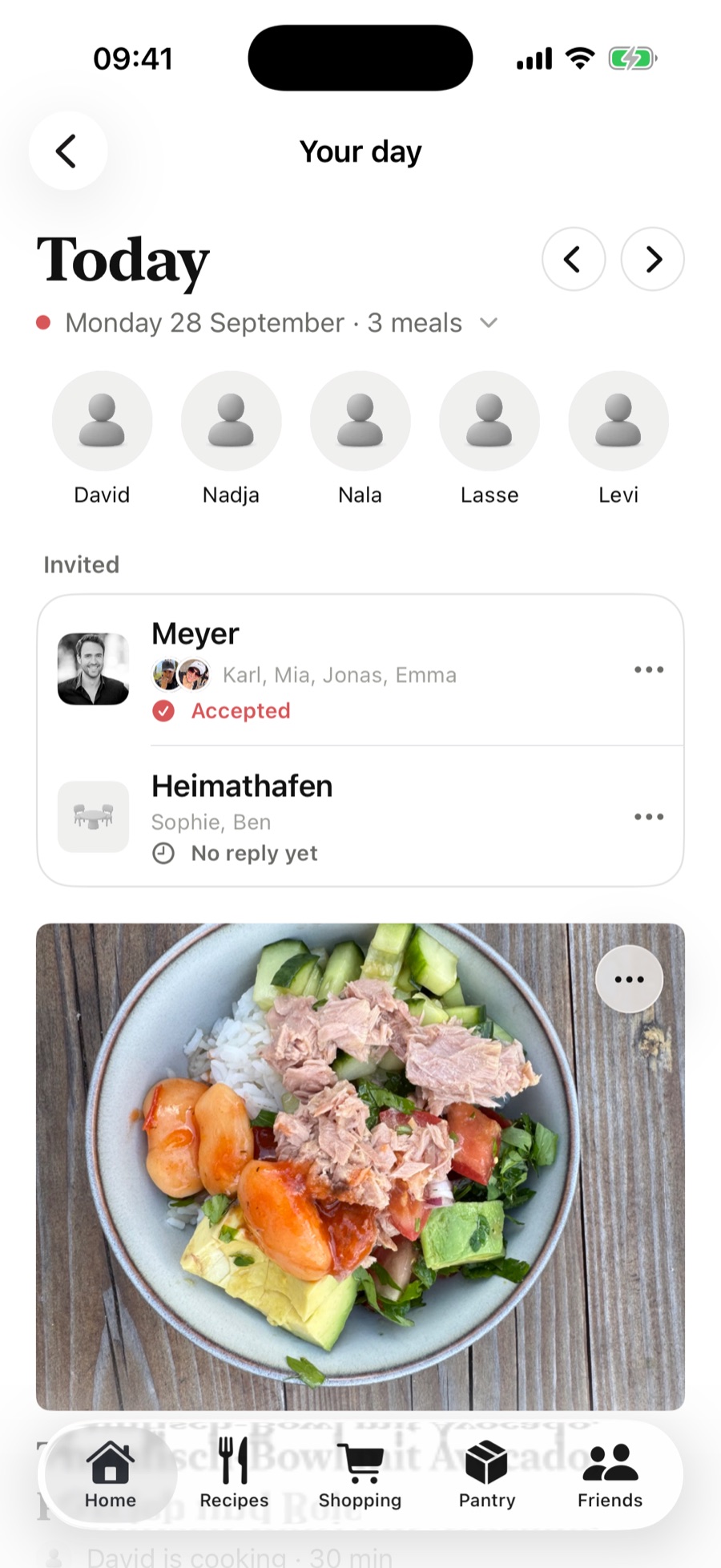
After that, the day view shows the Invited card: each kitchen with its names and its status, “No reply yet”, “Accepted” or “Declined”. Every reply arrives as a notification. Guests who’ve accepted join the day’s row of people, and if you picked the wrong kitchen, you can withdraw the invitation from the menu.
For the guests: reply with one tap
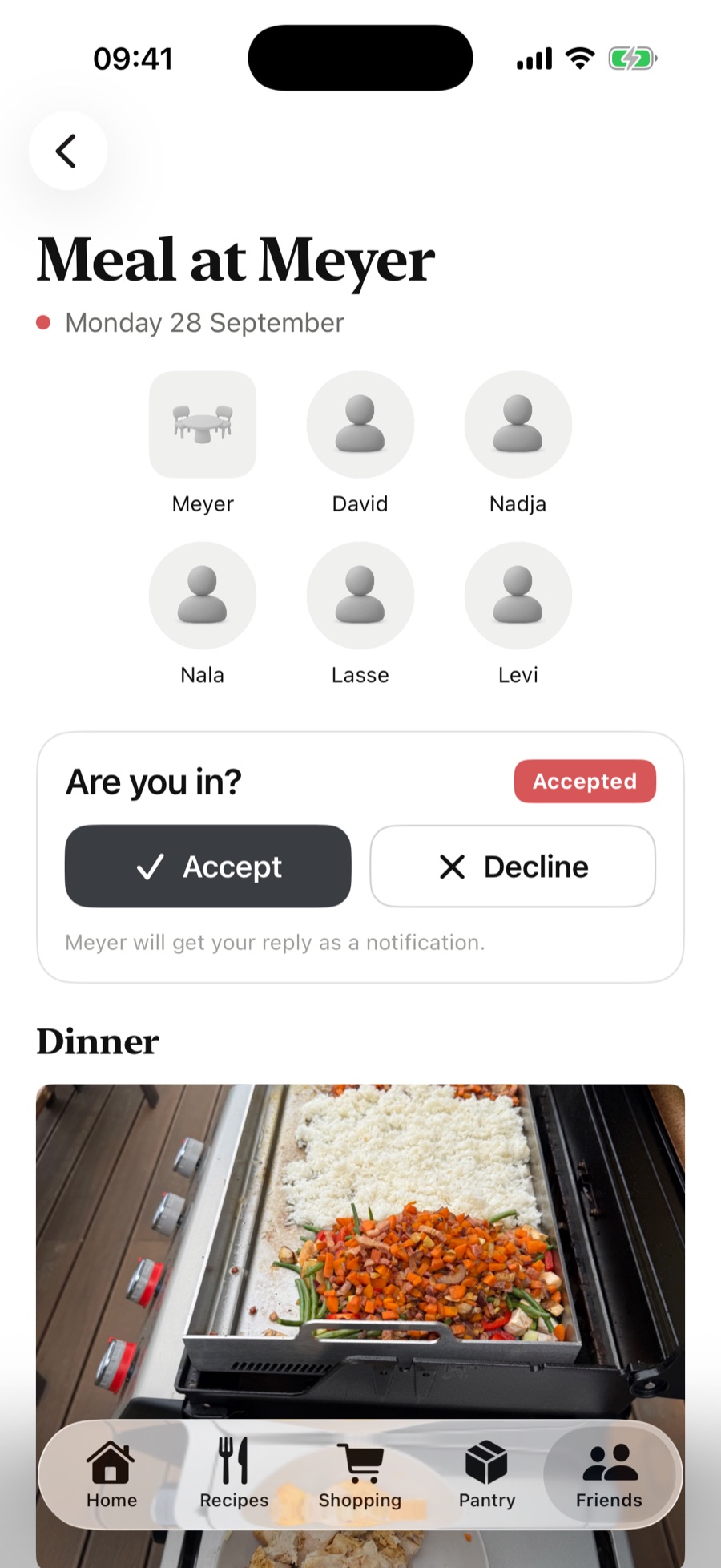
The invitation lands in the Friends tab and, once accepted, on the home screen too: “At Meyer” shows up where your own meal would be. The invitation itself looks like a day view: “Meal at Meyer”, the date, who’s there, and below it the dishes with photos and who’s cooking them. Accept or decline with one tap, and change your mind just as easily. Kids can see the status, the grown-ups do the replying.
Bring something along (and avoid three pasta salads)
Once you’ve accepted, you can tap Bring something along and pick one of your own recipes. It shows up for the host straight away as another dish of the day, with a photo and a note that Karl is bringing it. All the other guests see it too. So “Shall I bring something?” is answered before anyone asks, and the pasta salad only turns up once. You can take your dish back with the bin icon on it, and the host can remove it too.
The web page for the meal: for everyone without the app
Not everyone has Superkitchen. Grandma, for example. For her, the day view has Share as web page under “More for this day”. One switch, and the app creates a link you can send by WhatsApp or email. Without any login, the page shows the date, who’s cooking, the dishes with photos, who’s bringing what, who’s coming and, for a restaurant, the address with a map link. Declines don’t appear, the page is public after all.
One week after the meal, the page goes offline by itself. Switch it off earlier and the link stops working immediately; switching it back on creates a new one. Search engines are kept out, so only people with the link can find it.
What guests see, and what they don’t
- They see: the dishes of the day with photos, who’s cooking, who else is coming, and a restaurant’s address. For an invitation to one meal, only that meal’s dishes.
- They don’t see: your other days, your ratings or your recipes, apart from the ones you explicitly share with friends.
- After dinner: if someone wants the recipe, set it to “Friends” on the recipe page. It shows up for your guests under “From your friends”, and one tap brings it into their collection.
Frequently asked questions
Can I invite friends who don’t have Superkitchen?
Yes, with the web page for the meal: send the link, done, no login needed. Replying and adding a dish happen in the app; for that, your kitchens connect as friends once.
What do invited friends see of our meal plan?
Only the day they’re invited to, and for an invitation to a single meal, only that meal’s dishes. Your other days, your ratings and any recipes you haven’t shared stay hidden.
Can I invite people just for breakfast instead of the whole day?
Yes. If the day has meals, the invitation asks “What are you inviting to?”. Your guests then only see that meal.
How long does the web page stay online?
Until one week after the meal, then it goes offline by itself. Switching it off makes the link invalid immediately, switching it back on creates a new one.
Can I withdraw an invitation?
Yes, in the Invited card, from the menu next to the kitchen. It disappears for your guests the next time they open the app; the app doesn’t send them a message about it. So a quick line in the chat is still polite.