 Superkitchen
Weekly meal plan: the 20-minute method for families (with template)
A weekly meal plan is a permission slip: six days without the question “What should I cook tonight?”. Less stress, fewer impulse buys, less food in the bin. Here’s the method that gets it done in 20 minutes, in a way you’ll actually stick to.
The 20-minute method (once a week)
Step 1: check the calendar (3 minutes). Who’s actually home when? Sports day, parents’ evening, long workdays: on days like these, don’t plan anything ambitious. Go for something quick, or eat out.
Step 2: the 4-2-1 formula (10 minutes). Filling the week with seven new ideas is the most common mistake. All you need: 4 classics that always work at your place, 2 quick days (under 25 minutes or a delivery, with zero guilt) and 1 leftovers day for finishing what’s there. A new recipe? One a week at most, or the plan topples over. Candidates come from your friends’ recipes and the Community, plus the screenshot of that reel you liked the other day.
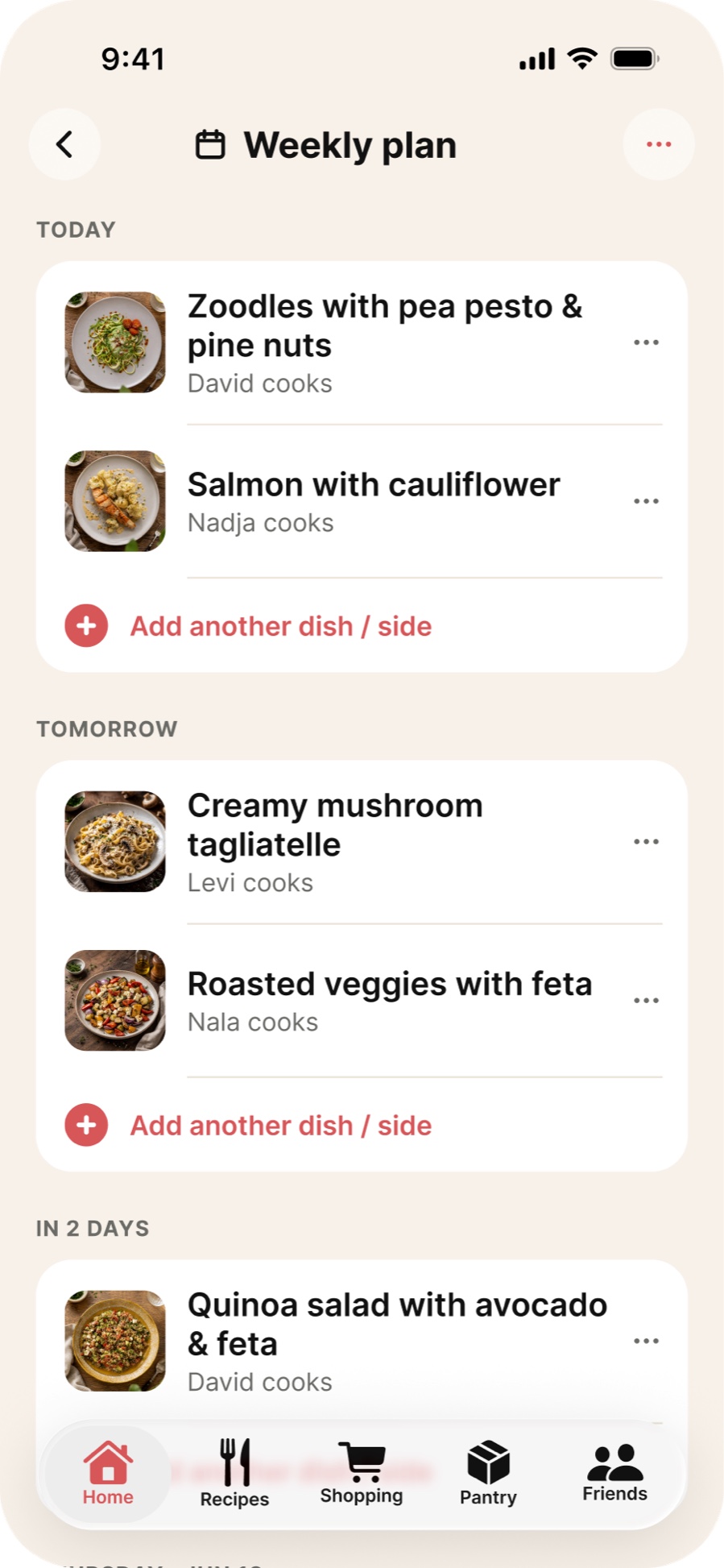
Step 3: add names (4 minutes). Every day gets a dish and a person: who’s cooking? That’s what turns the plan into a team effort. Kids can take a day too (wraps and pizza toast are doable, see below). In Superkitchen, whoever gets put down to cook gets a notification on their phone that it’s their turn tomorrow. “I forgot” no longer counts.
Step 4: work out the shopping list (3 minutes). The plan tells you what to buy: one big shop replaces four frantic ones. Anything you already have comes off the list. In Superkitchen, your planned meals sit at the top of the Shopping tab: tap one, or all of them, to see what’s missing, and put it on the list with one tap.
The template: a sample week
Copy it, print it or take a photo of it: this is what the 4-2-1 formula looks like filled in.
| Day | Dish | Who cooks? | Type |
|---|---|---|---|
| Monday | One-pot pasta with tomatoes and peas | Dad | Classic |
| Tuesday | Roasted veg tray bake with feta | Mum | Classic |
| Wednesday | Roll-your-own wraps | Kid + Dad | Quick |
| Thursday | Potato and spinach gratin | Mum | Classic |
| Friday | Leftover buffet: everything must go | everyone | Leftovers day |
| Saturday | New recipe: tuna bowl | Dad | 1× new |
| Sunday | Pancakes (or a delivery, depending on the day) | Kid + Mum | Quick |
Your columns can have different names. Only three things matter: every day has a dish and a person, and the plan hangs where everyone can see it.
How the method works in Superkitchen
- Plan right on the home screen. Tap a free day and your recipes appear. Each one shows how many ingredients are already at home, and wishes are marked. Restaurants, delivery services, leftovers and “Self-service” days are one tap away. Tap the plus and the meal is in the plan, several on one day if you like.
- “Cook on …” on every recipe page: Today, Tomorrow, Day after tomorrow or a date. That puts a classic in the plan in two taps.
- Columns or a list. The meal plan shows your days side by side, or as a list if you’d rather scroll. In edit mode, you drag a meal to a different day.
- Visible to everyone. The home screen shows your week from today, on every phone in the kitchen. When someone plans a meal, the others get a short notification.
- Keep going with the recap. The month card counts planned days and your longest streak, and the recap hands out medals for full months and milestones for streaks, with confetti. Sounds silly, works anyway.
- Plan for guests. Friends coming on Saturday? Invite them straight from the plan; their replies and the dishes they’re bringing land on the same day.
The 4 most common mistakes (and how to fix them)
- Too ambitious: Nobody keeps up seven new recipes a week. The fix: the 4-2-1 formula.
- No leftovers day: Without one, Thursday’s leftovers end up in the bin and the plan feels rigid. The fix: Friday is leftovers day, officially and proudly.
- One person plans everything: Then the plan is just mental load in a new outfit. The fix: planning is a 20-minute family appointment, and the plan has names in it.
- The plan is invisible: A note in a drawer plans nothing. The fix: the fridge door, or an app everyone has on their phone that tells the others as soon as someone plans something.
The trick that gets kids on board
What kids mostly object to is not being asked. So give them fixed wish slots: every child gets to pick one dish a week (yes, pasta counts). The rule afterwards: whoever wished for a meal doesn’t negotiate on the other days. In Superkitchen everyone gets three wishes. Tap a wish to plan it straight away, and when you plan, it shows up right next to the matching dish. Bonus: a quick vote after dinner on what was good. You’ll soon see which dishes are your classics, and you won’t have to reinvent the week every time.